Proxmark3 RFID Security for Defenders
A defender's guide to Proxmark3 RFID security — auditing 125 kHz and MIFARE Classic credentials, detecting cloned badges, and migrating to DESFire EV3 and AES.

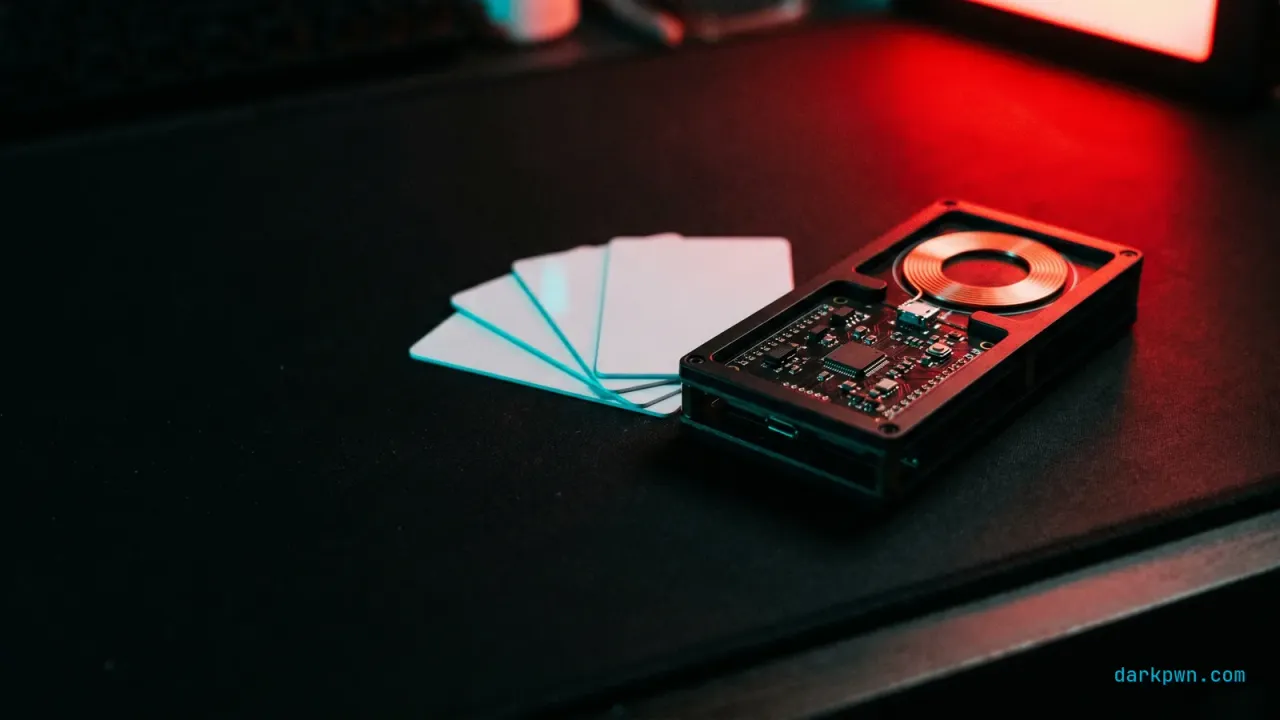
Proxmark3 RFID security work, for a defender, is credential auditing: using the reference RFID research tool to prove which of your access cards are weak before an attacker does. Where a Flipper Zero handles default-key and legacy cards, the Proxmark3 goes further — cracking non-default MIFARE Classic keys with nested attacks and analyzing low-level protocol behavior. That makes it the auditor’s instrument for answering one question: can our badges be cloned, and what do we migrate to? This guide is the defensive playbook.
An unauthorized RFID device at your perimeter is a hardware addition — T1200 — Hardware Additions in MITRE ATT&CK. The defensive use of the same tool is to find the weak credential first.
What is a Proxmark3 and why does it matter for defenders?
The Proxmark3 (commonly the RDV4) is a dedicated RFID/NFC research platform that reads, analyzes, and tests both 125 kHz (low-frequency) and 13.56 MHz (high-frequency) credentials. Its defensive value is depth: it does not just copy default-key cards, it can run nested and hardnested attacks to recover custom MIFARE Classic keys in a lab — which is exactly how you prove whether a deployed card is actually secure or just appears to be.
For a defender running an authorized access-control audit, that depth is the point. A card that resists a Flipper might still fall to a Proxmark3, and knowing which is true for your badges is what prioritizes the migration budget.
What RFID credentials are weak, and what replaces them?
| Credential | Security | Auditor’s verdict |
|---|---|---|
| 125 kHz (HID Prox, EM4100, Indala) | None (plain ID) | Replace — trivially cloned |
| MIFARE Classic (CRYPTO1) | Broken cipher | Replace — crackable even with custom keys |
| MIFARE DESFire EV1 | AES, strong | Acceptable; EV3 preferred |
| MIFARE DESFire EV3 / iCLASS SE / Seos | Modern crypto | Recommended target |
| Mobile credentials (NFC/BLE) | Dynamic auth | Strongest; phishing-resistant |
The migration story is consistent with the Flipper Zero NFC risk: the frequency does not determine security, the cryptography does. 125 kHz and MIFARE Classic are the replace-now population.
Why upgrading the card may change nothing
Here is the finding that most often reshapes an access-control roadmap, and it has nothing to do with the card.
Between the reader on the wall and the controller in the cupboard runs a protocol, and in a large share of deployments that protocol is Wiegand — a 1980s design that is unencrypted, unauthenticated, and unsupervised. The reader decodes whatever credential it saw and sends the resulting bits down the wire in the clear. The controller has no way to verify that the message came from the reader, or that it has not been replayed.
The consequence is stark: an attacker with physical access to the reader’s wiring can capture credentials and replay them regardless of card technology. Migrating from MIFARE Classic to DESFire EV3 changes what happens in the air gap between card and reader. It changes nothing about the cleartext bits travelling from the reader to the controller. You can spend an entire budget cycle on credentials and leave the actual bypass untouched.
Reader wiring is usually accessible, because the reader is mounted on the unsecured side of the door by definition — that is where people badge in. The screws are on the outside.
| Layer | Protocol | Protected? |
|---|---|---|
| Card ↔ reader | 125 kHz | No — a plain readable ID |
| Card ↔ reader | MIFARE Classic (CRYPTO1) | Broken cipher |
| Card ↔ reader | DESFire EV3 / Seos | Yes, with correct configuration |
| Reader ↔ controller | Wiegand | No — cleartext, unauthenticated, unsupervised |
| Reader ↔ controller | OSDP with Secure Channel | Yes — AES-encrypted and supervised |
OSDP with Secure Channel enabled is the fix. It encrypts and authenticates the reader-to- controller link, and being supervised, it also detects a reader being disconnected or tampered with — which Wiegand cannot, since a cut wire and an idle reader look identical to it.
Two things to verify before assuming you have this. OSDP-capable hardware frequently ships with Secure Channel turned off for installation convenience, and it is easy to run OSDP in the clear and gain nothing but a different wire count. And the tamper switch is only useful if somebody is actually alerting on it — plenty of systems generate tamper events that go to a panel nobody monitors.
What the 26-bit format actually gives an attacker
The other structural weakness is the credential format itself, and it is a matter of arithmetic rather than cryptography.
The most widely deployed access format, 26-bit Wiegand (H10301), lays out as: one parity bit, an 8-bit facility code, a 16-bit card number, and one more parity bit.
That gives you:
- 256 possible facility codes — and organisations frequently share them, because facility codes are assigned per installation and the pool is small.
- 65,536 possible card numbers per facility code.
- No cryptography whatsoever. The credential is a number. There is no challenge, no response, and nothing to verify beyond the number’s presence in a database.
An attacker who learns your facility code — from one badge, from a photograph, or by inference — has reduced the problem to a 16-bit space. That is not a cracking exercise; it is a list.
The defensive implications are concrete and often overlooked:
- Card numbers should not be sequential. If badge 1041 and 1042 were issued to adjacent desks, the numbering scheme is itself the vulnerability, and enumeration produces valid credentials rather than random ones.
- Larger formats are meaningfully better. 35-bit, 37-bit, and vendor-specific extended formats widen the space substantially. They remain uncryptographic, so this raises cost rather than closing the class, but it is a cheap improvement at the next card order.
- Deactivate promptly and completely. In a 16-bit space, a departed employee’s number will be reissued eventually. Stale-but-valid credentials in the controller are the population your reconciliation detection depends on being accurate.
- Never publish a badge photograph. Facility codes and card numbers are printed on many cards, and staff photographs on social media disclose them regularly.
How MIFARE Classic actually falls
The post asserts above that custom keys do not save you. It is worth being specific about why, because “the cipher is broken” is where most write-ups stop and it does not convey the shape of the problem.
| Situation | Approach | What it needs |
|---|---|---|
| Default keys still in place | Try the known transport keys | Nothing — a published list |
| No keys known | Darkside attack (2009) | The card, briefly |
| One sector key known | Nested attack (2009) | The card, and the remaining keys fall quickly |
| Hardened PRNG (Classic EV1) | Hardnested | The card, and more computation |
The row that matters is the second. Darkside recovers a key with no prior key knowledge, which means “we set custom keys” does not establish a starting point an attacker lacks. Once any one sector key is known, the nested attack recovers the rest of the card rapidly. Custom keys move you from the first row to the second — a real increase in effort, and not a change in outcome.
This is why the migration recommendation is unconditional rather than risk-based. There is no configuration of MIFARE Classic that is secure against an attacker with the card in hand for a short period, and “in hand for a short period” describes any badge left on a desk at lunchtime.
The DESFire deployment that is no better than 125 kHz
A specific and depressingly common failure: an organisation migrates to DESFire, and the readers are configured to authenticate against the card’s UID rather than performing cryptographic authentication against a key stored in an application on the card.
The UID is not a secret. It is transmitted before any authentication occurs, and on many card types it can be emulated. A DESFire card read by UID is functionally a more expensive 125 kHz card, and the migration delivered a purchase order rather than a security control.
This happens because UID-only mode is easier: no key management, no card personalisation, no coordination between the card supplier and the reader configuration. It is the default path when nobody owns the crypto side of the project.
Verify this explicitly. During an audit, confirm that readers perform an authentication exchange and reject a card presenting a valid UID without the corresponding key. If your reader grants access to a credential that cannot complete the cryptographic exchange, the entire migration is decorative — and this is a five-minute test with a card you deliberately provision without the application key.
How to detect cloned RFID credentials
A clone is byte-identical at the reader, so detection lives in the access-control data — the same principle as broken access control detection for web apps, applied to doors.
A badge that was never issued
The cleanest signal: a credential ID that authenticates but is not in your issuance database. That is a rogue or cloned card by definition.
index=physical sourcetype=access:badge action=granted
| lookup issued_credentials credential_id OUTPUT holder, status
| where isnull(holder) OR status!="active"
| stats count, values(reader_id) AS readers by credential_id
| sort - count
Use from an anomalous reader
For environments on Microsoft Sentinel, the same logic in KQL flags a credential appearing at a reader it has never used — a sign of a clone moving through the building.
AccessBadge_CL
| where Action_s == "granted"
| summarize firstReader = min(TimeGenerated) by CredentialId_s, ReaderId_s
| join kind=leftanti (BadgeReaderBaseline_CL) on CredentialId_s, ReaderId_s
| project TimeGenerated = firstReader, CredentialId_s, ReaderId_sWhat the reconciliation detection cannot catch
The rules above find credentials that are not in your issuance system. That is a real and useful detection, and it is worth being clear about the case it misses entirely.
A clone of a currently valid, correctly issued badge is byte-identical to the original and appears in the issuance database as an active holder. The reconciliation query returns nothing, because as far as every record is concerned, an authorised person opened a door. This is also the likely case — an attacker cloning a badge clones one that works.
Three detections cover that gap, and they rely on physics rather than records:
- Impossible travel. The same credential at two readers too far apart for the elapsed time. Simple, effective, and requires only badge logs and a distance table between readers.
- Anti-passback. A credential that has entered must exit before it can enter again. If the original holder is inside and the clone badges in at the front door, the second read is refused outright. This is a preventive control rather than a detection, and most access-control systems already support it — it is usually disabled because it generates complaints when someone tailgates in without badging and is then stuck.
- Behavioural anomaly. A credential used at an hour, a door, or a frequency that does not match its holder’s established pattern.
Anti-passback deserves the argument. Its friction is real and it is the only control in the list that stops a clone rather than reporting it afterwards. Enabling it at sensitive doors only — the data centre, the lab, the executive floor — captures most of the benefit while confining the complaints to a small population who can be told why.
The honest summary: you cannot detect the cloning, and you can detect the clone being used alongside the original. That constrains what a monitoring programme can promise, and it is another reason the credential and wiring upgrades are the primary work rather than the follow-up.
How to run a Proxmark3 credential audit
In an authorized physical-security engagement on systems you own:
- Identify each credential’s technology and frequency at every reader.
- Test 125 kHz cards — they are plain IDs; confirm the replace list.
- Test MIFARE Classic for default and crackable custom keys (nested/hardnested in a lab) to prove real weakness.
- Validate reader anti-cloning — confirm modern readers reject emulated/cloned credentials.
- Document the migration roadmap by reader, prioritized by exposure.
How to harden RFID access control
- Multi-factor at sensitive doors (badge + PIN/biometric) so a clone alone fails — this is the control that holds even when the credential, the reader protocol, and the format are all weaker than you would like.
- Reconcile credentials continuously against the issuance system (detection above).
- Rolling/dynamic credentials over any static, replayable ID — a credential that answers a challenge differently every time cannot be replayed from a recording, which is the property every static format lacks by construction.
Common RFID security mistakes
- Trusting custom MIFARE Classic keys. CRYPTO1 is broken; custom keys only delay.
- Assuming higher frequency means secure. 13.56 MHz MIFARE Classic is broken.
- No credential reconciliation. Without it, a cloned badge is invisible.
- Banning tools instead of fixing credentials. The card technology is the control.
- Upgrading the card and leaving Wiegand on the wire. The reader-to-controller link is cleartext and unauthenticated; the credential upgrade does not reach it.
- Deploying OSDP without enabling Secure Channel. It ships off for installation convenience and provides no cryptographic benefit until it is on.
- Running DESFire in UID-only mode. The UID is not a secret and is sent before authentication; the card is then no stronger than a 125 kHz badge that cost more.
- Sequential card numbers. In a 16-bit space, predictable numbering turns enumeration into a list of valid credentials rather than a search.
- Publishing badge photographs. Facility codes and card numbers are printed on the card and routinely disclosed on social media.
- Leaving deactivated credentials active in the controller. Numbers get reissued in a small space, and stale entries corrupt the reconciliation your detection depends on.
- Relying on reconciliation to catch clones. It finds credentials not in the issuance system. A clone of a valid badge is a valid badge, and only impossible travel or anti-passback sees it.
- Leaving anti-passback disabled because it generates complaints. It is the only control here that stops a clone rather than reporting one; enable it at sensitive doors and explain why.
- Ignoring reader tamper events. Supervised protocols report tampering, and that report is worth nothing if it lands on a panel nobody watches.
Proxmark3 RFID security checklist
- Inventory credential technology and frequency at every reader.
- Flag and schedule replacement of all 125 kHz and MIFARE Classic credentials.
- Audit MIFARE Classic for default and crackable custom keys (authorized lab only).
- Migrate to DESFire EV3 / iCLASS SE / mobile credentials; eliminate default keys.
- Deploy anti-cloning readers; add MFA at sensitive doors.
- Reconcile every granted credential against the issuance database in the SIEM.
- Alert on un-issued IDs, impossible travel, and first-seen-reader anomalies.
- Maintain a prioritized migration roadmap by exposure.
- Establish what protocol runs reader-to-controller, and enable OSDP Secure Channel where it is available but switched off.
- Verify readers reject a card that cannot complete cryptographic authentication — the five-minute test that proves you are not running DESFire in UID-only mode.
- Move to a wider credential format and non-sequential card numbers at the next card order.
- Enable anti-passback at sensitive doors, and alert on reader tamper events to somebody who reads them.
Item 9 belongs at the top of the list rather than the bottom in most estates. The credential migration is the visible, budgeted, satisfying project; the wire between the reader and the controller is the one an attacker with a screwdriver actually uses, and it is frequently a firmware setting away from being fixed.
The takeaway
Proxmark3 RFID security is about auditing your own credentials to depth, then migrating off CRYPTO1 and 125 kHz to DESFire EV3 or AES-based credentials — while reconciling badge logs to catch the clones in the meantime. Continue with Flipper Zero NFC risk and HackRF defensive RF awareness, or browse the full Hardware Security pillar.
Training & tools referenced
Disclosure: Some links below are affiliate links. If you buy through them, darkpwn may earn a commission at no extra cost to you. We only recommend training and tools we actually use in our own lab, and affiliate links never influence editorial coverage.
- Proxmark3 RDV4The RFID research platform used for the credential audits in this guideLab HardwareCheck price
- TryHackMeAuthorized labs to build RFID and access-control security skillsSecurity TrainingStart training
Frequently asked questions
What is a Proxmark3 used for in defense?
A Proxmark3 is the reference RFID research tool defenders use to audit access credentials — identifying card technology, testing whether MIFARE Classic cards still use default or crackable keys, and validating that readers reject cloned cards. It is more capable than a Flipper Zero because it can run nested and hardnested attacks against MIFARE Classic to prove key weakness in a lab.
How is a Proxmark3 different from a Flipper Zero?
The Flipper Zero is a consumer multi-tool good for default-key MIFARE Classic and legacy 125 kHz cards. The Proxmark3 is a dedicated RFID platform that can crack non-default MIFARE Classic keys (nested/hardnested), analyze low-level protocol behavior, and audit credentials a Flipper cannot — which is why it is the auditor's tool.
How do you detect a cloned RFID badge?
Because a clone is identical at the reader, detect it in the access-control system: a badge ID that is not in your issuance database, the same credential used at impossible-travel speed, or use from a reader the credential has never touched. Deploy readers with anti-cloning checks for prevention.
What should replace MIFARE Classic and 125 kHz cards?
Migrate to MIFARE DESFire EV3 or other AES-based credentials, iCLASS SE/Seos, or mobile credentials with dynamic authentication. Eliminate default keys first, then plan the technology migration; NIST SP 800-116 Rev 1 guides higher-assurance PIV deployments.
Keep reading
Flipper Zero NFC Risk: What Teams Should Know
The real Flipper Zero NFC risk for security teams — what it can and cannot clone, MIFARE Classic weaknesses, access-control detection, and credential hardening.
BadUSB Controls for Engineering Teams
BadUSB controls that survive contact with engineering teams — USB device control, HID allowlisting, USBGuard and WDAC, plus detection that does not block real work.

Evil Twin Access Points: Defensive Controls
Evil twin access point defenses for blue teams — detect rogue APs with a WIDS, why 802.1X server-cert validation and WPA3 matter, plus a captive-portal DNS signal.